Switching CRMs isn’t just about built-in features—the system needs to communicate smoothly with your other platforms. For decision-makers, the core concerns are often whether integrations are feasible and how long they will take to implement.
We sat down with developer Petter Vegsund Brodin and CTO Steinar Talmoen to hear how Nextcom ensures efficient, hassle-free integrations in practice.
Quick setup with system and integrations
A new CRM is supposed to make everyday work easier. For many, however, it marks the beginning of a long, expensive integration nightmare: $200,000. Three years. And still not at the finish line. It doesn’t have to be this way.
“The actual implementation of Nextcom CRM is fast, and customers are typically up and running within one to two days. System integrations don’t have to be the costly and time-consuming process that many fear either,” says Brodin.
Nextcom is developed with one clear philosophy: making the complex simple.
“We often get questions about feasibility based on specific needs, and the answer is usually yes — it can be resolved.”
Direct access to developers
The developers aren’t hidden behind layers of project managers and support tiers. Located in Sandefjord, they work closely with customers and are always within reach.
“We are a small team of six developers. Many of us handle both development and customer contact, which allows us to understand needs quickly,” says Brodin.
This means the customer’s technical resources speak directly with Nextcom’s developers. Tech-to-tech. Without a middleman.
“This makes everything easier. We speak the same language and find solutions faster,” he smiles.
Single-tenant architecture allows room for customization
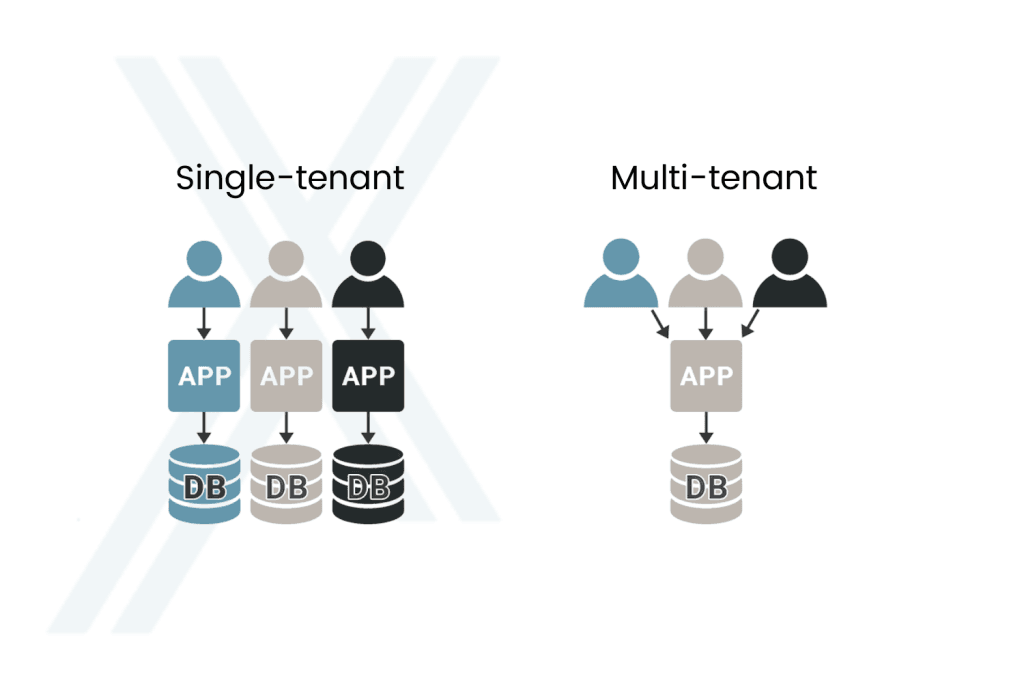
Nextcom utilizes a single-tenant architecture, which keeps each customer’s data separated in distinct databases. In practice, this makes building customer-specific customizations much easier.
“When every customer has their own database, file structure, subdomain, and server, we can deploy customer-specific code that applies only to them. That is not as straightforward in systems where everyone shares one massive database,” Talmoen explains.
It is easier to create customer-specific customizations in a single-tenant architecture.
He points out that many clients use Nextcom purely as a sales system, pulling confirmed orders, call recordings, or PDFs from other systems. Others build custom dashboards to display specific KPIs their business cares about, which might not natively exist in Nextcom. For larger clients, tailor-made solutions have been crucial when integrating proprietary tools and software into the CRM.
Easy to use for the customer’s own developers
At the core of Nextcom’s integration philosophy are user-friendly APIs (Application Programming Interfaces).
“Our goal is for our APIs to be easy to use, so that the customer’s developers can work independently without needing help from us,” says Talmoen.
Brodin adds that Nextcom often acts as a sparring partner during the preparation phase. He highlights an example of a customer who closed sales in Nextcom but needed a customized order confirmation processed in another system. The solution was to pull the order functionality out of Nextcom — and then send the status back via API.
“The customer came in with an idea, but the final solution ended up being both simpler and different,” says Brodin. “We use our experience to guide customers and assist their developers to achieve the best and most cost-effective result.”
Backward compatible
A common fear when it comes to software is maintenance: “Do we have to rewrite everything the next time a new feature is released?”
At Nextcom, backward compatibility is a core principle. New features shouldn’t break the old ones.
“We have very few cases where we have to ask customers to change their code. New functionality should not disrupt the existing setup. Integrations should be safe to build on over time,” Talmoen explains.
Saves time and prevents errors
The ultimate purpose of integrations is to enable different systems to exchange data automatically and in a structured way, meaning information only needs to be entered once before it can be used wherever it is needed.
“When data flows seamlessly between systems, you eliminate duplicate work. You avoid errors. Things just run automatically. It saves both time and costs,” Brodin concludes.
Get started quickly with CRM and seamless integration